Digital Card of Čierne
The digital citizen card leverages the technological capabilities of a mobile wallet. Mobile wallet is a collective term for the native "Apple Wallet" and "Google Wallet" applications built into all iOS and Android devices.

How do I download my digital card?
After registering in My Zone and successful verification, you will receive an email with your digital card and access credentials. You can save the card to your mobile wallet in just a few clicks.
Via the "Download card" button
Click the download button in the email. The card will appear on your screen; simply save it to your wallet.
By scanning the QR code
Scan the QR code from your profile or email and the card will automatically appear on your phone.
After logging into your account
In My Zone, you will find both the QR code and a button to re-download the card, e.g., after changing your phone.
Tip: If your phone asks for permission for notifications during the card saving process, please allow them so you can receive important messages. If you change your phone, you will find the QR code in your profile and can easily re-download the card.
Get your Čierne Citizen Card
Fill out the registration form and create an account in My Zone. After verification, a digital card will be sent to your email.
Create account
Front and back side of the card
The digital card has two "sides". On iOS, flip the card by clicking the three dots in the top right corner; on Android, scroll down.
Front side
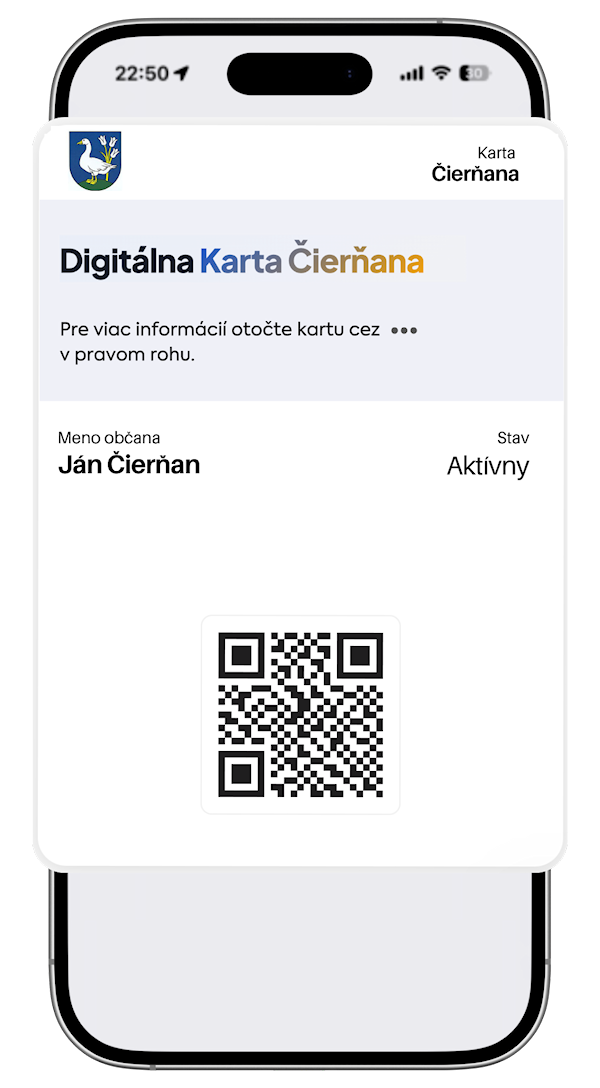
Logo, dynamically changing image, dynamic text fields, and a QR code serving as an identifier. All fields and graphics can be updated automatically at any time.
Back side
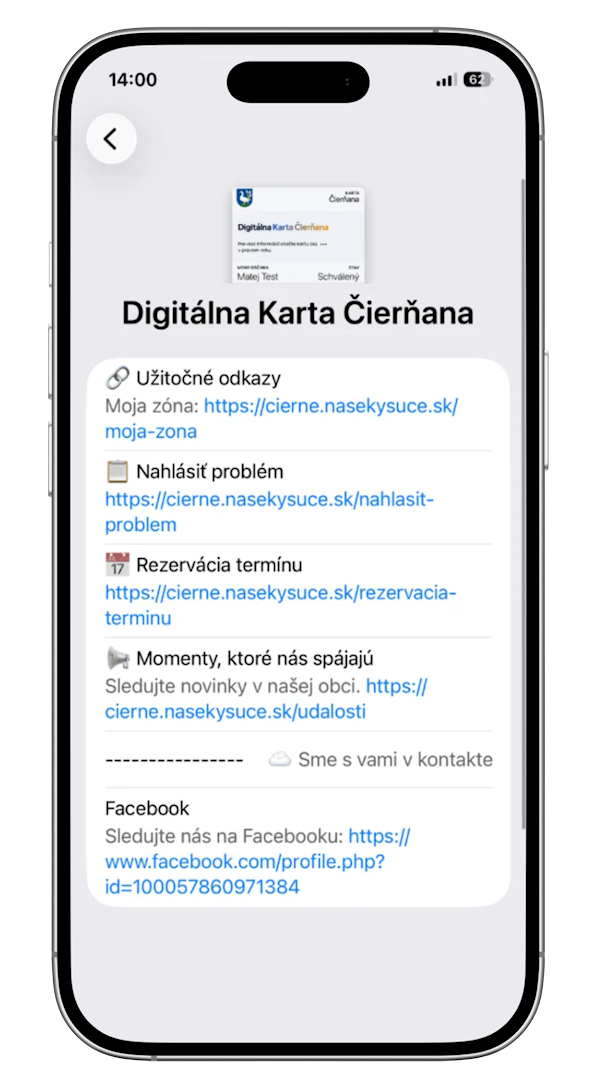
Text information, active links, benefits, news from the municipality, and important updates. Divided into separate sections, each dedicated to a different area.
Benefits of using a digital card
Current information
The card updates automatically. You will always find current benefits and important news from the municipality.
Many benefits
All benefits in one place in your mobile wallet. You can use them easily.
Easy to use
You can find your card in the Wallet app. The QR code is used for identification with partners.
Discounts from partners
Draw benefits, discounts, and special coupons from partners in the municipality and surrounding area.
Always be in the center of the action
Thanks to automatic card updates and notifications, you won't miss anything important. That is why it is important to enable notifications.
Important messages and news from the municipality
Event notifications
Information about current benefits
Android
- Update Android OS
- Enable notifications in phone settings
- Enable notifications in browser settings
- When downloading the card, allow notifications via the displayed window
iOS
- Open Apple Wallet
- Go to the back of the card (three dots in the top right corner)
- Click on card details
- Find the "allow notifications" button
Download the card to your mobile
Add the Čierne card to your Apple Wallet or Google Wallet and keep it always at hand.
